Simplify Panic Button Supervision with ADMP
Learn how ADMP Panic Button Monitoring (Beta) centralizes button status, wiring faults, endpoint connectivity, activity logs, and email alerts.
Estimated reading time: 7 minutes
Overview
Organizations rely on connected communication devices to support everyday operations and emergency response across their facilities. Buttons are one part of this system, allowing users to initiate calls, alerts, announcements, and other configured responses during urgent situations.
However, users also need a practical way to confirm device status, connectivity, and operational readiness, which is where the Algo Device Management Platform (ADMP) comes in. ADMP gives users a centralized way to monitor and manage supported Algo endpoints.
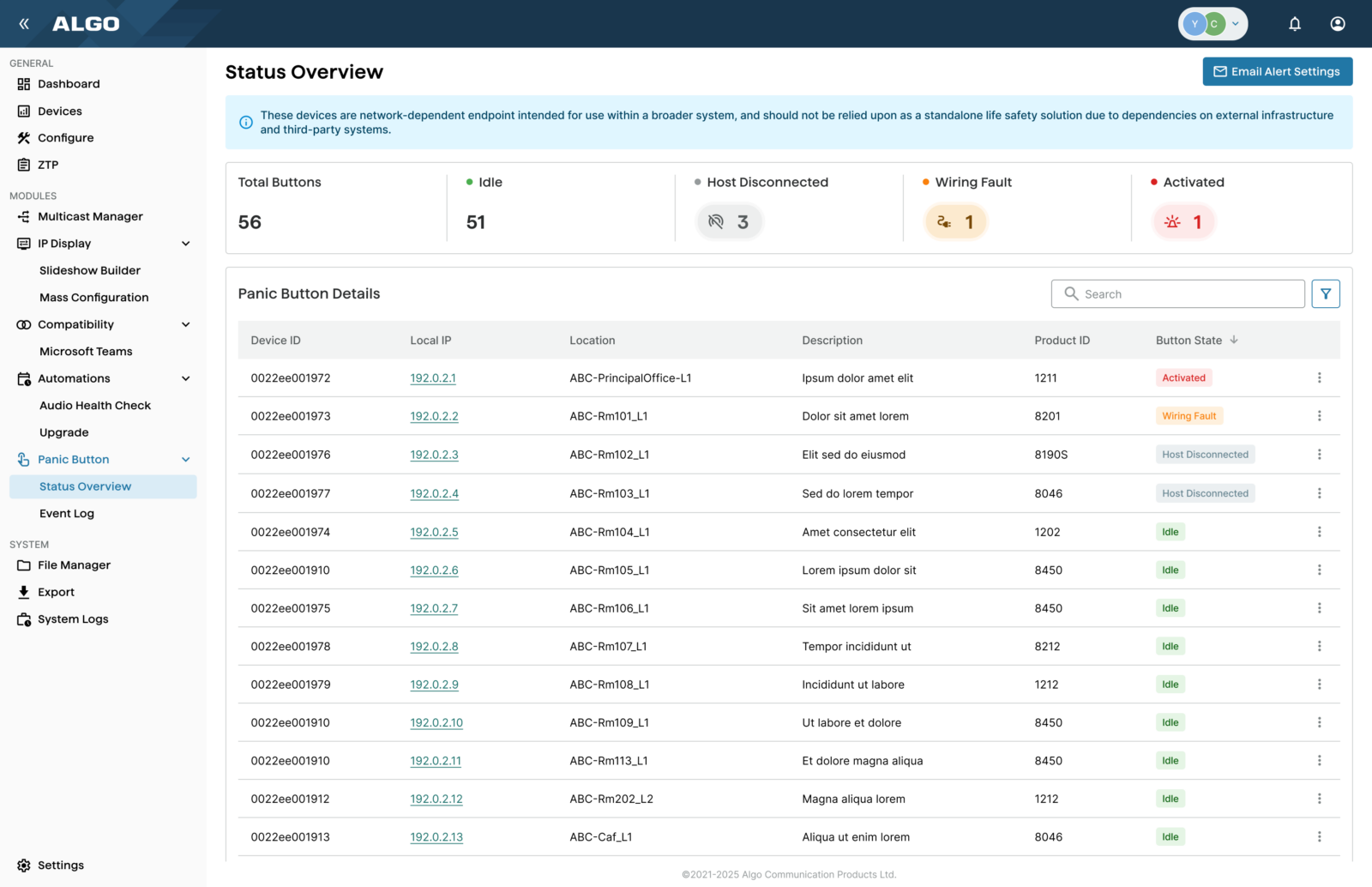
The Panic Button Monitoring module (Beta) in ADMP shows the status of physical buttons, supervised relay inputs, and screen buttons on the Algo 8450 IP Console that have been configured as panic buttons.
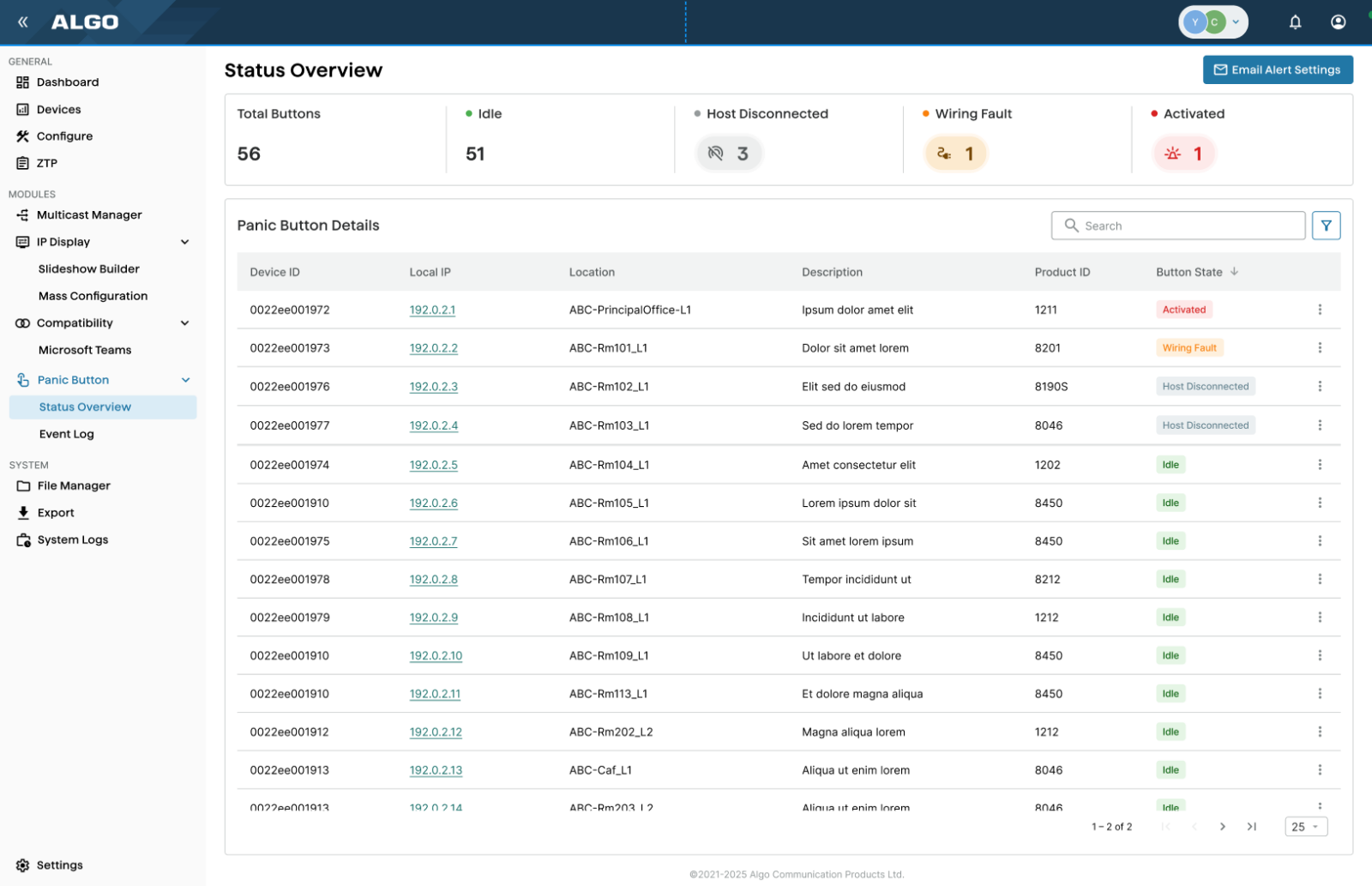
The module provides a centralized view of button status, associated endpoint and location information, and activity logs, with email alerts available for wiring faults and changes in device status.
Please note, this feature is currently in Beta. If you would like to participate in Algo’s Beta program and receive access to ADMP beta features, please contact your account representative.
What the ADMP Panic Button Monitoring Module Does
ADMP monitors each panic button through its host Algo IP endpoint. From the Panic Button module, users can:
- Review the status of monitored panic buttons.
- View details for an individual button.
- Identify the Algo IP endpoint associated with the button.
- Assign a location and description to make the button easier to identify.
- Detect supervised wiring faults.
- Identify changes in the host endpoint’s connection status.
- Export activity logs for troubleshooting, reporting, or audits.
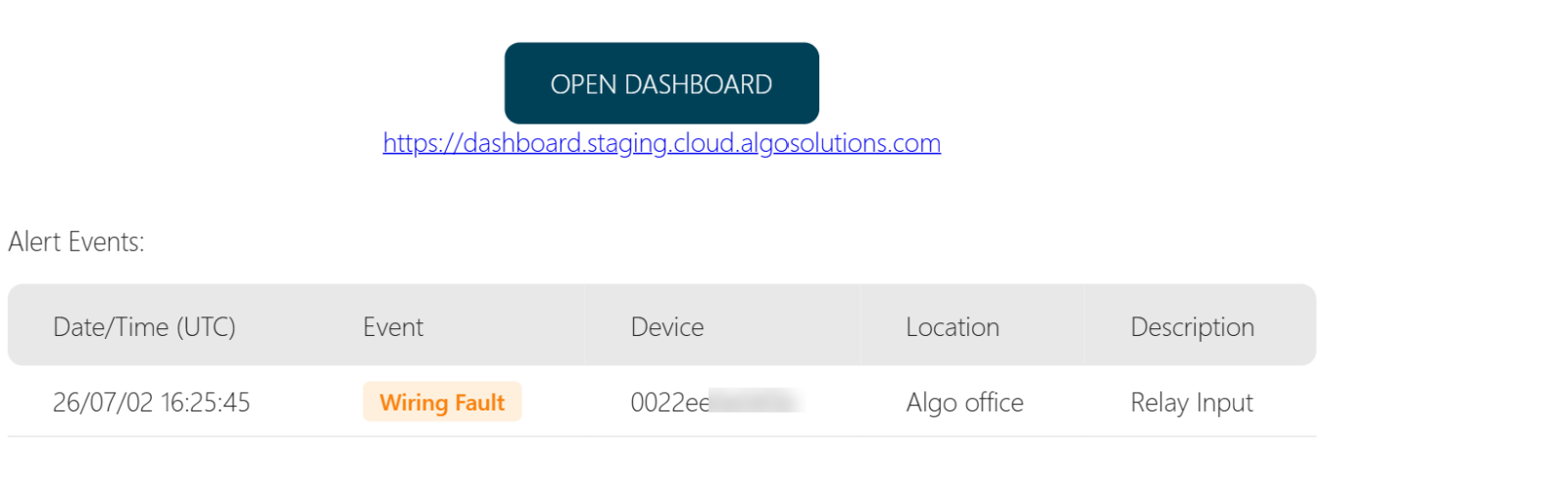
- Configure email notifications for selected fault conditions.
This centralized view helps users monitor buttons deployed across multiple rooms, buildings, campuses, or customer sites without checking every endpoint individually.
ADMP Supported Buttons and Accessories
ADMP supports buttons across the Algo portfolio, whether they are built into Algo IP endpoints or connected through relay-input accessories.
Supported buttons on Algo IP endpoints include:
- Algo 8190 and 8190S.
- Algo 8028g2.
- Algo 8201.
- Algo 8203.
- Algo 8211 / 8212.
- Algo 8450 (via Action Button and configurable screen buttons).
Supported buttons for relay-input accessories include:
- Algo 1202.
- Algo 1203 or other normally open supervised relays.
- A normally closed supervised relay.
- Algo 1211 / 1212.
Accessories must connect to a compatible Algo IP endpoint through the smart relay interface. Powered and supervised by the host endpoint, these accessories can be configured as fully supervisable panic buttons without requiring a dedicated network connection, consuming a network port, or carrying the cost of a fully network-connected device.
Please note, ADMP monitors the button but it does not perform the button’s operational actions. Calls, multicast messages, emergency alerts, or other responses are still configured on the host endpoint.
See Important Safety Information for Buttons below.
Requirements for ADMP Monitoring
Before a button appears in the ADMP Panic Button Status Overview, certain conditions must be met.
The host endpoint must:
- Be connected to the organization’s ADMP account.
- Have ADMP Cloud Monitoring enabled.
- Be online and reporting to ADMP.
- Have Panic Button Monitoring enabled.
- Have the applicable button configured, as a panic button.
- Have configuration synchronization enabled so ADMP can retrieve the required device information.
Users can also enter a location and description for each button. For example, the location might be “Main Building Lobby,” while the description could identify the button’s purpose or the response it initiates.
Note: Algo endpoints require firmware version 5.2 or later for ADMP management. Current firmware is recommended because some monitoring functions may depend on newer endpoint software.
What Is a Reported Fault?
A reported fault does not necessarily indicate that the physical button itself has failed. It may identify a problem elsewhere in the monitored connection.
Users may need to inspect:
- The button.
- The cable or terminal connection.
- The supervision circuit.
- The relay input on the host endpoint.
- The host endpoint’s power or network connection.
- The endpoint’s connection to ADMP.
By identifying the affected button and its host endpoint, ADMP helps technical staff determine where to begin troubleshooting.
Activity Logs and Email Alerts
ADMP also maintains an activity log for monitored panic buttons. The log can include:
- Timestamps.
- Button state changes.
- The local IP address of the host endpoint.
- The configured button location.
- The configured button description.
Users can export this information for incident reviews, troubleshooting, maintenance records, or internal audits.
ADMP can also send fault notifications to up to three email addresses. Fault notifications are available for supervised wiring faults and for changes to the connection status of the host IP endpoint. Notifications are sent approximately 10 minutes after the associated event occurs.

Why Centralized Supervision Matters
Overall, centralized panic button monitoring can help users avoid manually signing in to each endpoint or travelling to every installation.
This can help organizations:
- Confirm that supported buttons remain connected and operational.
- Proactively detect wiring and connectivity problems.
- Identify the affected button and host endpoint more quickly.
- Reduce troubleshooting time and unnecessary site visits.
- Maintain records of button state changes and reported faults.
- Support routine maintenance and internal audit processes.
- Manage larger deployments with less manual effort.
By adding centralized supervision for supported panic buttons in ADMP, organizations can identify faults earlier and maintain a more reliable emergency communication system.
For more information, see:
Important Safety Information for Buttons
TERMS & CONDITIONS
This device is not intended to function as a standalone life safety or mass notification system. It is designed as a network-dependent endpoint that may form part of a broader communication or alerting solution when integrated with complementary systems, infrastructure, and operational processes.
Operation of this device is inherently dependent on network availability, power continuity, configuration accuracy, and the performance of associated third-party hardware, software, and services. As such, system performance may be impacted by factors outside of Algo Communication Products Ltd.’s control, including but not limited to network outages, latency, misconfiguration, interoperability limitations, or failure of integrated systems.
Customers are solely responsible for evaluating the suitability of this device within their specific use case, including any life safety or emergency communication requirements, and for implementing appropriate redundancies, testing procedures, and failover mechanisms. This device should not be relied upon as the sole or primary means of emergency notification without a comprehensive understanding of the risks associated with IP-based communication systems.
To the maximum extent permitted by applicable law, Algo Communication Products Ltd. disclaims all liability for any direct, indirect, incidental, or consequential damages arising from the use, misuse, or inability to use this device, including any failure of the device itself or any integrated systems. Algo does not warrant or guarantee performance in critical situations, particularly where such performance depends on third-party components or environmental conditions beyond its control.
For guidance on proper deployment, system design, and risk mitigation, please contact Algo Communication Products Ltd.
Key Takeaways
- The Algo Device Management Platform (ADMP) supports panic button monitoring to ensure operational readiness during emergencies.
- The Panic Button Monitoring module in ADMP provides a centralized view of button statuses, activity logs, and customizable email alerts for wiring faults.
- Supported buttons include various Algo IP endpoints and relay-input accessories, requiring specific setup for ADMP to function.
- Centralized supervision helps identify faults earlier, reduces troubleshooting time, and maintains a reliable emergency communication system.