Ways to Initiate Paging and Emergency Communication with Algo
Learn different ways to initiate Algo paging and emergency communication using the 8450 IP Console, physical buttons, SIP extensions, external inputs, and REST APIs.

Estimated reading time: 9 minutes
Overview
Many organizations rely on everyday and emergency communication to reach people across their facilities. But how does that communication get started?
With Algo devices, there are several ways to initiate a page, notification or alert, whether that’s a button press, SIP call, API request, or input from another device or system.
The appropriate method depends on the communication being sent, who or what needs to initiate it, and how the organization operates.
These methods can support both everyday communication and emergency response, including:
- Live voice paging
- Pre-recorded announcements
- Zone-based paging
- Lockdown, evacuation, and other emergency alerts
- Staff assistance requests
- Visual notification
- Two-way communication
Algo devices can function as SIP endpoints, multicast transmitters or receivers, API-controlled devices, and interfaces to external systems. This allows communication to be initiated both manually and automatically, depending on the application. This article outlines the various methods for triggering different events with Algo and explains how each method fits into an IP paging and notification system.
Ways to Initiate Communication with Algo
| Method | How it works |
| Algo 8450 IP Console | A user presses a configured touchscreen button to initiate an action |
| Algo Buttons | A user presses a physical IP or accessory button to trigger a pre-configured action |
| SIP extension | A user calls a configured extension to initiate a page or alert |
| REST API | An application or another Algo device sends an API request to trigger an action |
| External input (Relay input) | A connected sensor, dry contact relay or a third-party device changes state and triggers a predefined action |
Facilities can use one or more of these methods, depending on where communication needs to begin and who requires access.
Initiating Communication from the Algo 8450 IP Console
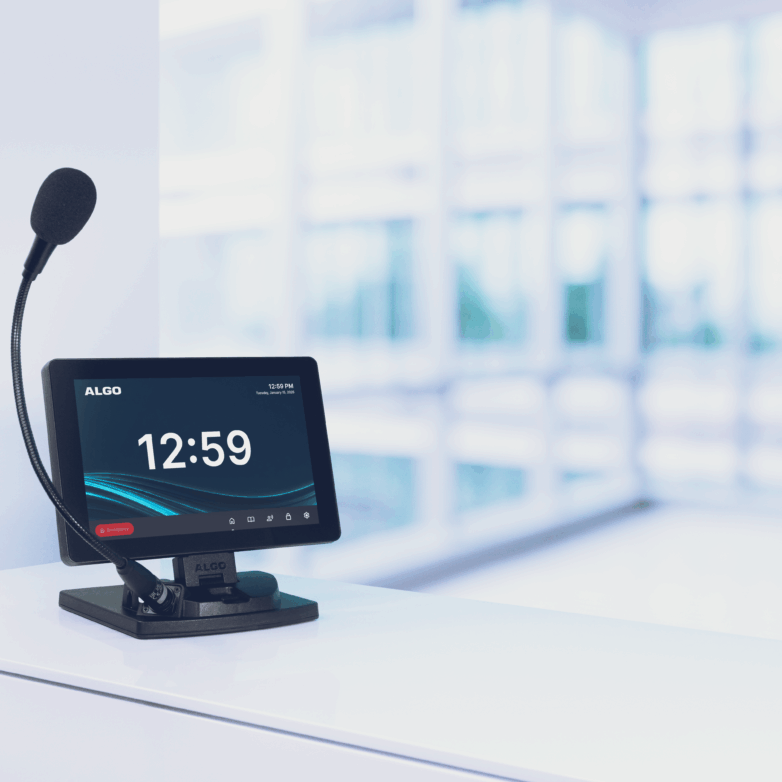
The Algo 8450 IP Console provides a touchscreen interface, allowing users to easily broadcast live or pre-recorded messages and initiate emergency alerts.
Users can press a configured touchscreen button to start the required communication. The function assigned to that button is referred to as the Button Action.
Organizations can configure touchscreen buttons for:
- All-building paging
- Individual paging zones
- Live announcements
- Lockdown alerts
- Evacuation alerts
- Medical alerts
- All clear
- Other predefined communication workflows
For example, when an administrator presses the “Lockdown” button on the 8450 touchscreen, the configured button action can initiate a pre-recorded emergency alert and distribute it to the required Algo endpoints using multicast. The same button can also place a SIP call to emergency dispatchers through the organization’s phone system and send up to five REST API requests to other supported Algo devices, applications, or third-party systems.
This functionality gives staff a clear, easy way to initiate and coordinate multiple parts of a lockdown response without needing to remember extensions or dialing sequences.
For an education-specific example, see Activating Paging and Emergency Alerts in Schools with the Algo 8450 IP Console.
Initiating Communication with a Physical Algo Button
A physical button offers a simple way for someone to initiate communication from a specific location.
Depending on the deployment, the button can either be a network-connected IP device or an accessory connected to a compatible Algo IP endpoint.
A button press can be configured to perform various actions, including:
- Multicasting a pre-recorded alert or announcement
- Initiating a SIP call and playing a notification when the call is answered
- Starting a SIP call for hands-free two-way communication through a compatible Algo endpoint
- Streaming audio from a connected microphone or a speaker’s microphone.
- Sending an API request to another Aldo device or a third-party system to initiate an action.
For instance, an accessory button connected to a compatible Algo IP endpoint through a smart relay can trigger a SIP call to a configured extension. When used with a compatible speaker, the same workflow can support hands-free two-way communication.
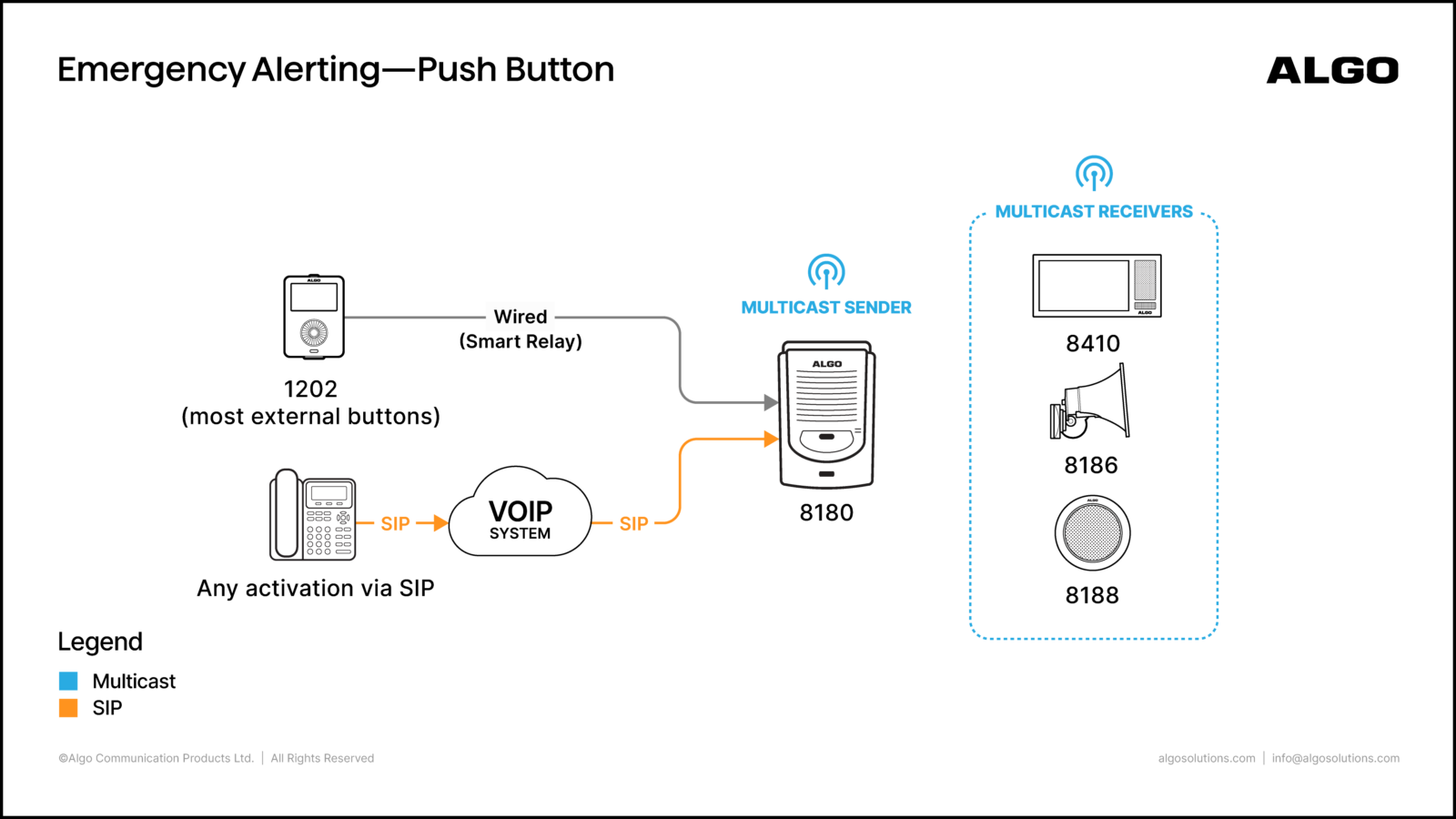
Alternatively, an Algo IP button can trigger a predefined action, such as multicasting a pre-recorded alert to IP speakers, visual alerters, or other multicast-enabled endpoints.
Regardless of the deployment method, physical buttons offer a straightforward, location-based trigger that does not require users to remember an extension or navigate another interface.
To compare physical buttons, see The Difference Between Algo Buttons.
Initiating Communication from a SIP Extension
For organizations already using SIP or UC-based communication, an IP phone or a softphone can provide another familiar way to initiate paging, alerts, and emergency notifications.
A user can dial a configured SIP extension to initiate any of the following on a supported Algo endpoint:
- Live voice paging
- Zone paging
- Pre-recorded alerts
- Emergency announcements
For example, an employee dials a configured emergency alert extension from a SIP telephone. The receiving Algo endpoint plays a pre-recorded announcement and can distribute the message to additional endpoints using multicast.
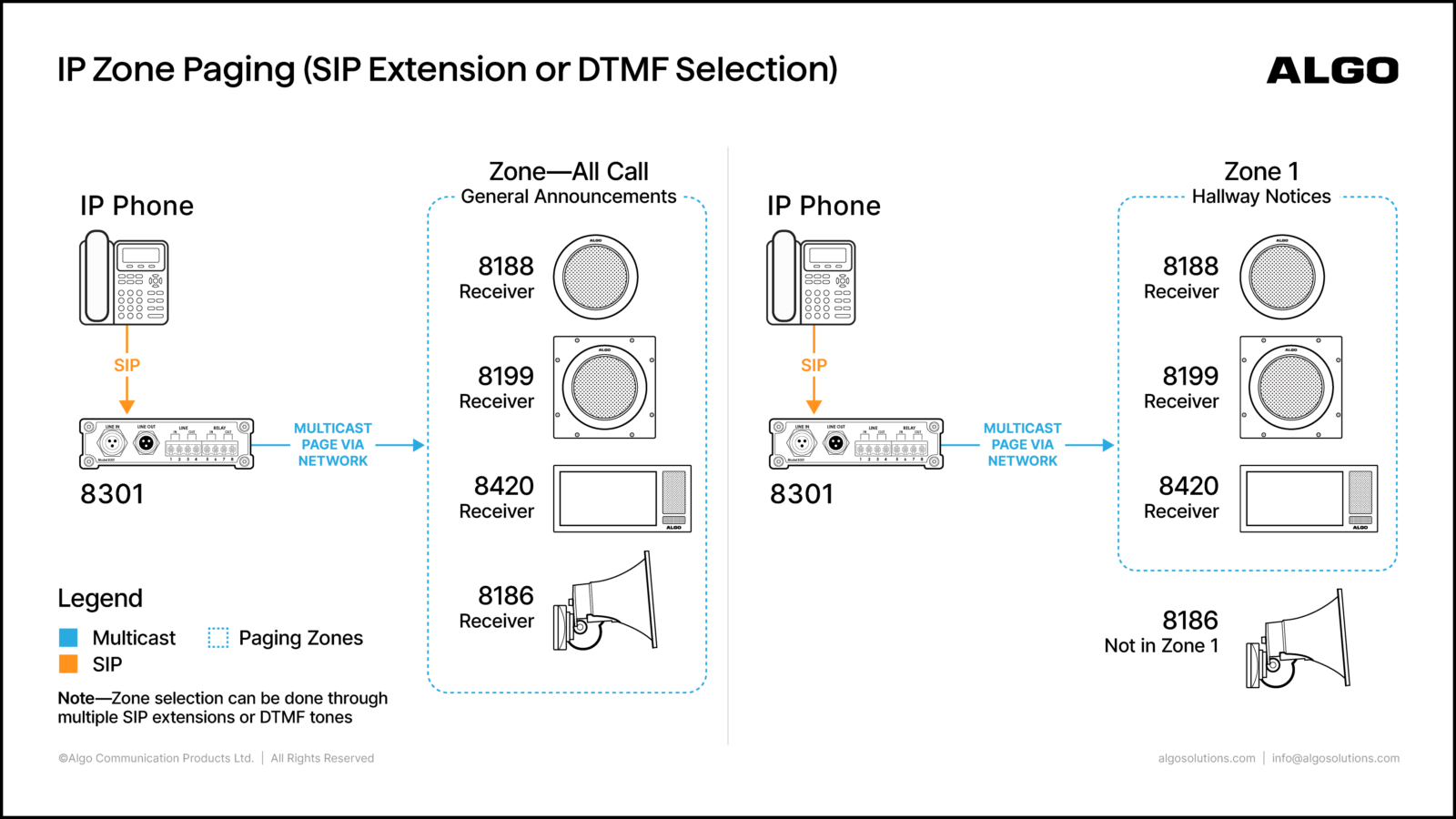
This allows employees to initiate emergency communication from the same UC system they already use for everyday calling.
A SIP extension can also be mapped to an 8450 IP console touchscreen button. This allows an authorized user to remotely activate a pre-configured action without being physically present at the console.
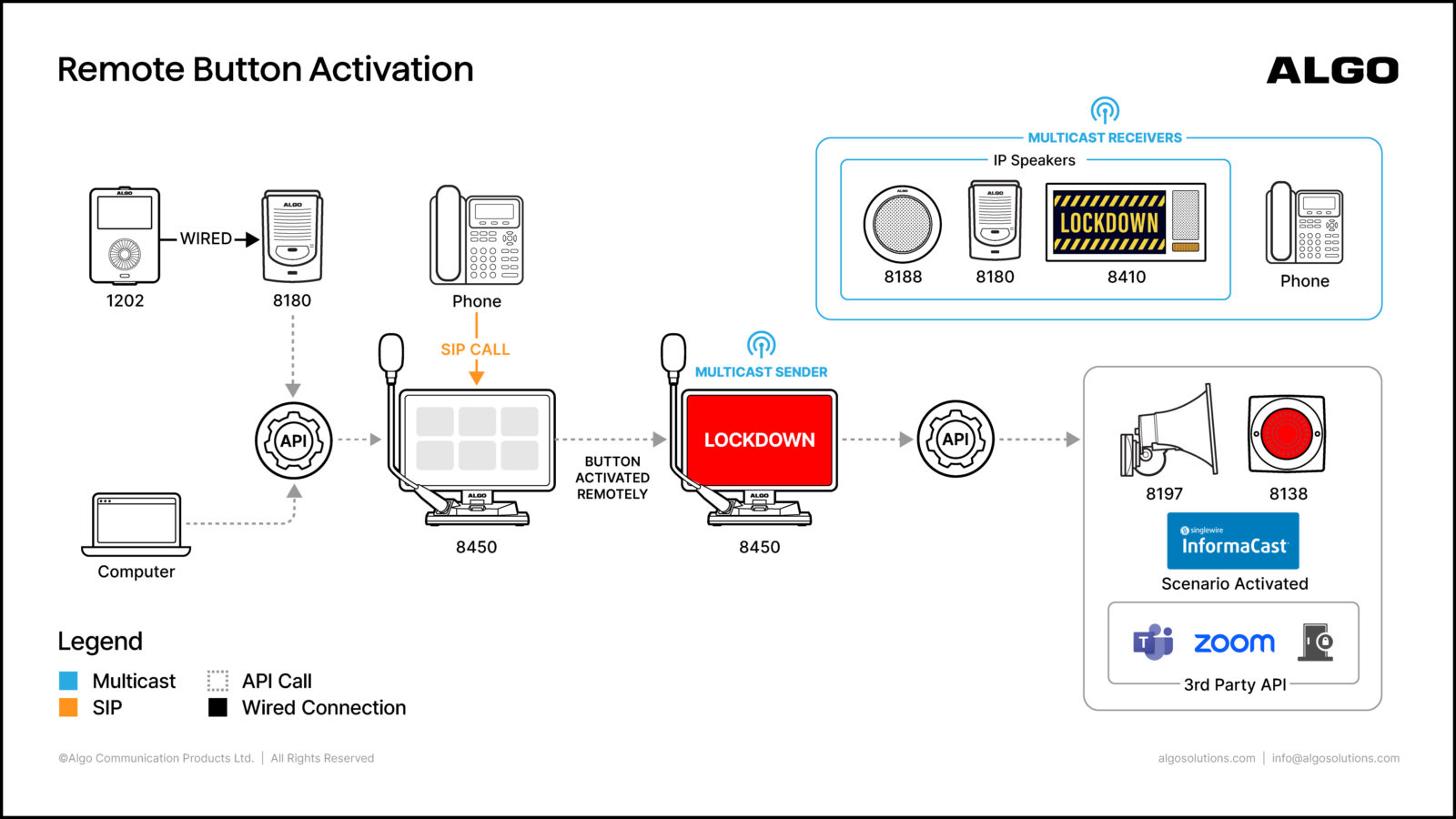
The 8450 supports up to 10 inbound SIP extensions mapped to different buttons, with optional passcode protection for authorized access.
Initiating Communication Through a REST API
Communication doesn’t always need to begin with a person pressing a button or placing a call. Supported Algo devices can receive REST API requests from software applications and third-party systems via API commands, which can be useful when communication needs to respond to an event detected by another application or system.
For example, at an airport screening point, a temperature screening system can use the Algo REST API to control an Algo 8138 IP Color Visual Alerter. If a reading is above 37°C, the application can send an API request instructing the 8138 to flash red. If the reading is at or below 37°C, it can send a different request instructing the device to flash green.
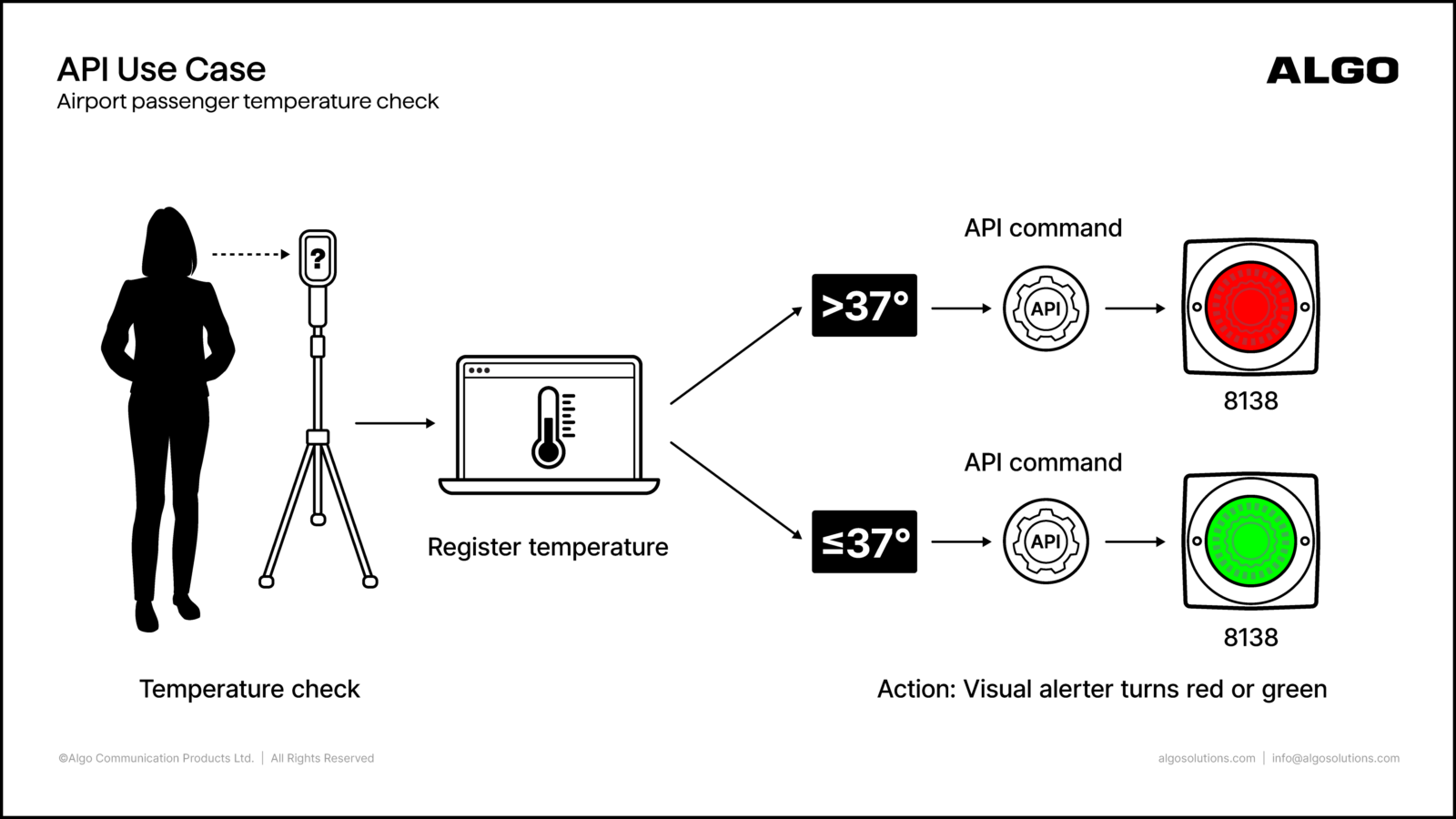
In this workflow, the screening system determines the temperature, and the Algo endpoint provides the corresponding indication without the need to manually trigger the alert.
Additionally, a REST API request can also remotely activate a configured touchscreen button on the 8450 IP Console without anyone placing a call or physically pressing a button.
Developers and system administrators can refer to the Algo RESTful API Guide for supported commands and configuration requirements.
Initiating Communication from an External Input
Communication can also begin with a sensor, relay contact, or third-party device. Compatible Algo endpoints can detect a change through an external input and perform a configured action.
This supports workflows in which communication should begin in response to an external condition rather than when a person manually initiates it.
For example, a door sensor connected to a compatible Algo endpoint can send out a notification when the door opens. An Algo IP speaker can detect the change via its relay input and play a chime to notify people nearby.

Choosing How to Initiate Communication
The appropriate method depends on how communication needs to begin.
- Algo 8450 IP Console provides centralized access to multiple paging, alerting, and communication workflows from a touchscreen interface.
- Algo buttons provide a physical device at a specific location for immediate access to predefined communication.
- SIP extensions allow employees to initiate communication using existing telephones and UC workflows.
- REST APIs connect communication with applications and other software-driven workflows.
- External inputs allow sensors or third-party devices to initiate communication when a defined event occurs.
These methods can also coexist within the same deployment. Central staff may use an 8450 while employees use physical buttons at individual locations, and applications initiate other communication through API requests.
What Happens After Communication Is Initiated?
Algo IP endpoints can deliver messages across the required areas via audio and visual alerting.
Depending on the deployment, this may include:
- IP paging adapters connecting IP communication with existing PA infrastructure
- IP speakers for voice paging and pre-recorded announcements
- IP horn speakers for larger or outdoor areas
- IP visual alerters for high-noise or accessibility requirements
- IP displays for visual messages

Together, these endpoints extend communication into rooms, hallways, outdoor areas, and other physical spaces where messages need to be heard or seen.
Additional Algo Capabilities That Support Communication
Algo also provides capabilities that help distribute, extend, automate, and monitor communication across a facility, including:
- Multicast: Distributes audio and alerts across groups of Algo endpoints and configured zones.
- Satellite Speaker Technology: Extends audio coverage from a main IP speaker to additional satellite speakers.
- Ambient Noise Compensation: Automatically adjusts speaker volume based on surrounding noise levels.
- Two-Way Talkback: Enables two-way voice communication through the embedded microphone in supported Algo speakers.
- Scheduler: Automates recurring communication such as bells, tones, announcements, SIP calls, multicast audio, and API requests at configured times.
- Endpoint Supervision: Helps monitor Algo IP endpoints and identify device or connectivity issues across the system.
Together, these capabilities help extend coverage, automate routine communication, and support reliable everyday and emergency communication across different environments.
For more information, see:
- Algo Buttons
- Algo 8450 IP Console
- Algo Button Comparison
- Activating Paging and Emergency Alerts in Schools with the Algo 8450 IP Console
- Algo RESTful API Guide
Key Takeaways
- Organizations can use various methods to initiate communication with Algo, including 8450 IP Console, buttons, SIP calls, API requests, and external sensors.
- The Algo 8450 IP Console allows users to broadcast messages and initiate alerts through a touchscreen interface.
- Physical Algo buttons offer location-specific triggers for alerts without needing to remember phone extensions.
- SIP extensions enable employees to initiate alerts directly from their existing communication systems.
- REST APIs and external inputs enable automated communication triggered by specific events, enhancing workflow efficiency.
How can I initiate Algo paging or emergency communication?
Algo communication can be initiated using an 8450 IP Console, physical buttons, SIP extensions, REST API requests, or external inputs from compatible sensors and third-party devices. The available methods depend on the Algo endpoints and configuration.
Can an 8450 touchscreen button be activated remotely?
Yes. A configured touchscreen button on the Algo 8450 IP Console can be activated remotely through an inbound SIP extension or REST API request.
Can I initiate an Algo alert from a phone?
Yes. Supported Algo endpoints can use registered SIP extensions for paging and pre-recorded alerts. A user can call the configured extension from a compatible SIP phone or UC environment to initiate the communication.
Can a sensor initiate an Algo notification?
Yes. Compatible Algo endpoints can use relay inputs to respond to sensors or third-party devices and initiate a configured action.